



(Update: I’ve been given 25 invites from WebNotes to give our readers to their private beta. The first 25 comments here will get invites. It’s worth it, give it a try! Even if you can’t get an invite, sign up on their site. The turnaround, in my experience, is pretty fast.)
Most, if not all, of the research I do is on the Web. When I write papers, do presentations, or study for finals, I spend a lot of time on the Web looking for information.
It used to be that I would find a page with something interesting on it, and either save the whole page and spend forever trying to find the interesting part again or have to copy and paste the interesting part elsewhere.
Not anymore. WebNotes, a new startup and new favorite of mine, has made research an easy, fun, and efficient process.
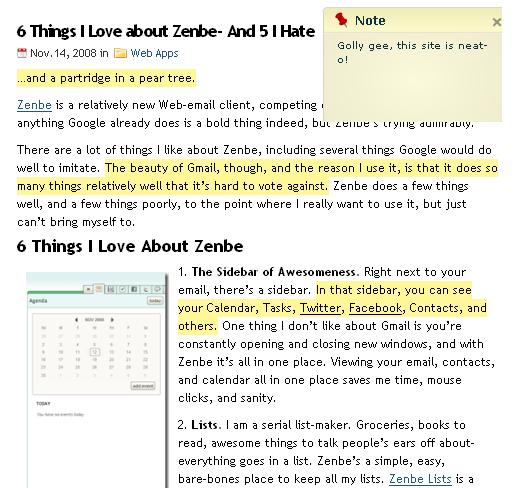
With WebNotes, the process couldn’t be simpler. You sign up, save a bookmarklet, and go Web surfing. When you get to a page with information you want to save, you click the bookmarklet, and up come your options. You can highlight text, or write sticky notes on the page- anywhere on the Web.
If you’re a Firefox user, there’s also a Firefox extension for WebNotes that offers many of the same features, and adds an attractive sidebar into Firefox where you can see all your annotations as you browse.

BLABLA
Webnotes saves the URL of the site as well as all your highlights and sticky notes, which makes it easy to go back and look at the original site- you won’t need to, though. Just highlight everything relevant, and all you’ll need to do is look in your WebNotes!
Anything you highlight or write is automatically extracted and saved in your “My Notes” section of WebNotes, where you can organize them however you see fit. I like to use folders for various research projects, to keep them organized.
You can search through every part of your annotations, which is great for when you’re looking for a quote or a snippet of information. WebNotes is full of AJAX, which means you don’t have to refresh the page every time you get a new note- they just show up. It sounds like a small thing, but it’s a big time- and sanity-saver.
You can also share your annotations and notes through email or a provided link, which is key for group projects. Annotations can also be made into attractive printable documents should you so desire.
Research shouldn’t have to require constantly switching between Word and the Web, just to make sure you don’t forget the one sentence you need out of a huge article. WebNotes saves you time, makes group research easier, and lets you store everything you need to know in one central place.
Whittle down the Web to the stuff you care about, and WebNotes’ll hang on to it for you.

Related posts:
Wow, this could be really helpful! I’d love to try the private beta.
About 90% of the research I do in school is done online, so something like this would be awesome. I’d love to try it out.
Thanks for bringing this to the notice. I would really like to try this since this could be helpful if it works.
As someone who is always printing pdf’s of websites to edit in Skim, this looks like it could be pretty useful. I’d love to give it a shot.
@The Three above-
I’ve sent you all your invitations to the beta! Let me know if you haven’t received them in the next few minutes.
I can’t wait to hear what you think about WebNotes- keep me posted.
David
I actually was thinking of something that could do such a thing when I was researching for a project of mine. Oh well, I already printed it out and used highlighter, this would have saved me a bunch of steps..but it would be useful for future projects for sure!
There are actually already a couple of Firefox extensions that do this. This one seems to be much more clean and smooth, so I’d love to take a whirl at using it.
Thanks for the invite giveaway.
-Rick
This sounds great, I’d love an invite. Thanks.
Sounds interesting, I’d love an invite. Thanks
After the invite, wonder how this stacks up to diigo.
Would be interesting to try it out for school work. Thanks for the giveaway.
What an interesting idea. I’d love an invite. Thank you.
Well, this is an interesting blog.
If you’ve still any invites, I would love to give this service a try. =
I’ve been looking for tool like this for very long, I would love to try it out
Thanks David. Id’love to try it out for my recent research.
I’d love to try this. I’ve been looking for a highlighter for a while. Thank you!
I’d also love to try it!
This would seem useful for research projects..I would like a invite as well please! Thanks!
Sounds like a very interesting tool. Would love to try it if you have invites left.
Oh Sweet! Im doing a research paper right now! I wanna try!!
Sounds like its really great! I’m surprised someone hadn’t thought about it before… Any invites left? I’d love one
Hey all,
Thanks for the comments! I’ve sent out invites to all of you, you should get them shortly.
@Umberto, @German, @Jerry-
Your emails didn’t work. If you would, leave another comment here with an email that will definitely work. I won’t spam you, and I’m the only one who will see your emails!
I hope you all enjoy, thanks!
THANKS!!! I am SO tired of cutting and pasting a million little notes
YOU ARE AMAZING. Thanks for sharing!!!
WOW, you are awesome. Thank you!
This looks great for writing college research papers. I’d love to try it out. Thanks.
sounds interesting. i’d like an invite if you still have one
Not sure if there are any left, but I would love one if there is
Hey all-
Another round of invites sent! Robyn, for some reason the email you provided didn’t work. If you leave another comment, and make sure you fill in the email section, I’d be happy to send you an invite.
Thanks to all of you! I have a few invites left, so come take them away!
David
Thanks so much!
David: Do you still have invites? Highlighter + notes: sounds very interesting…
Would love an invite to try. Just came across the blog today. Good work.
@Daniel and Shrivatsa-
Sending invites now. Daniel, sorry it took me so long!
I hope you both enjoy WebNotes as much as I have.
David
I’m really late commenting…do you have any invites left? I’d love to give it a try.
I am a Diigo user for a while now. Just tried webnotes. I do not think it has even a fraction of cool features that diigo offers.
@johncohn- I agree. Diigo rules. The thing is, though, it gets overcrowded when I use it for both research and bookmarking. For me, at least, it helps to keep them separate, and for pure research, WebNotes is great.
@Hannah- invite coming your way ASAP.
I would love to try out Webnotes, if you have any invites left!
Any invites left?
Interesting site. It’s really helpful for all. I will bookmark this site. Thanks.
Nice site. I download Firefox extension in my browser. Now i easily highlight my important notes. Thanks.